With words (open vocabulary)
Type person, horse or window. Based on YOLOE-26 (runs locally) and Qwen-VL (through the OpenRouter API). Output: boxes and outlines, with their pixel coordinates.


Wijad Academy 2026 · Ifpo Beirut · November 2026
A local web app to annotate heritage images — manuscripts, monuments, excavations — with foundation models: without training, with a few examples, or after a few minutes of training.

Type person, horse or window. Based on YOLOE-26 (runs locally) and Qwen-VL (through the OpenRouter API). Output: boxes and outlines, with their pixel coordinates.
Draw a box around two or three examples, or click them. Based on YOLOE-26 visual prompts (runs locally). Output: the similar objects, on the page or across the corpus.
Outline every stone of a wall, or click one object. Based on FastSAM and SAM 2.1 (run locally). Output: precise outlines and a vector drawing — SVG with layers and legend, DXF, GeoJSON.
Accept some annotations, then train. Based on YOLO26 (runs locally, a few minutes on a laptop). Output: your own model, which annotates the rest of the corpus.
Also — IIIF manifests, scan quality control, questions to Qwen about a region (transcribe, describe), exports to PAGE XML (eScriptorium), W3C / IIIF annotations, COCO, YOLO and CSV. Every result is a pre-annotation: accept, correct or reject it.

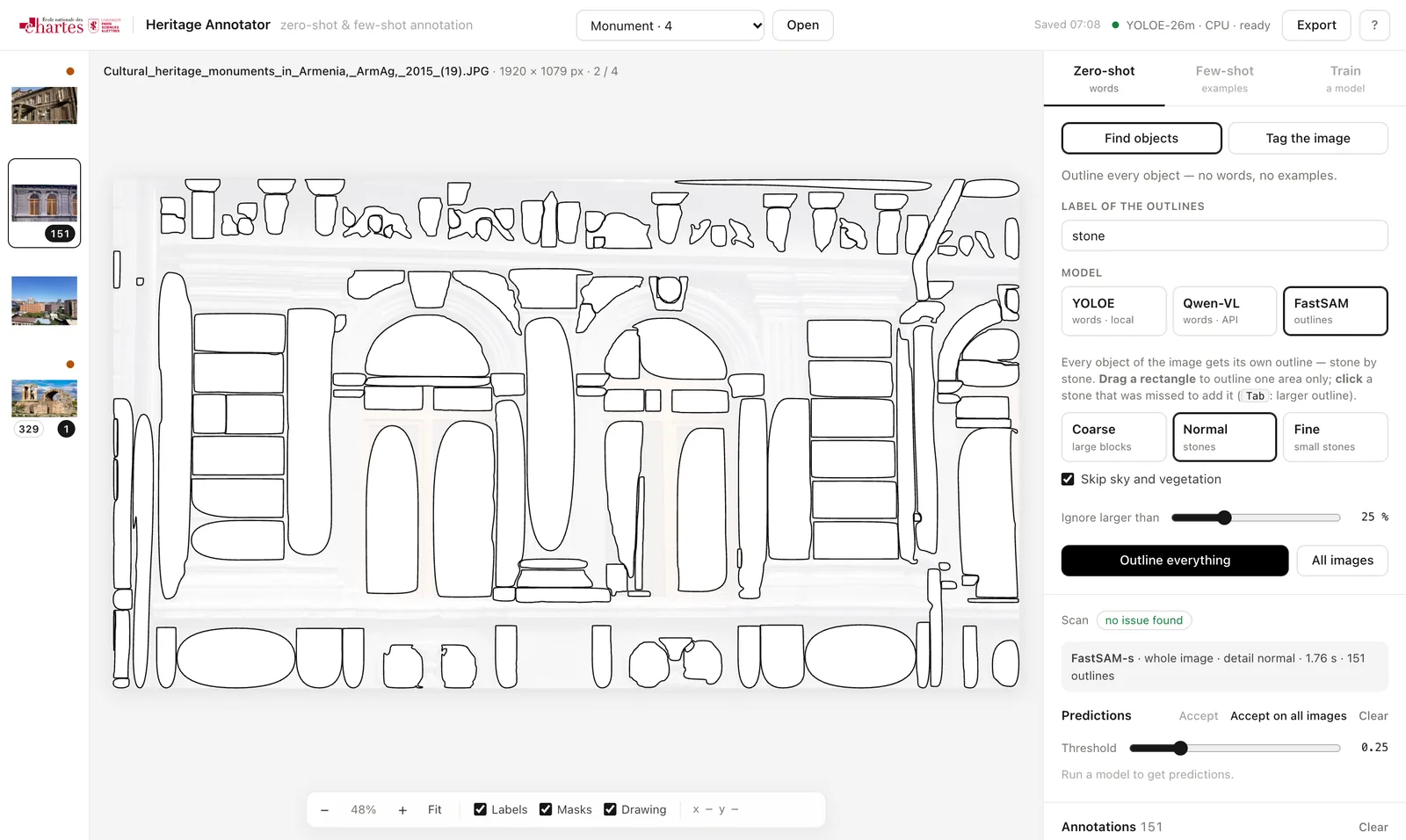
The models run on your own machine — a recent laptop CPU is enough, a GPU makes it faster — so your images never leave it, except those you choose to send to Qwen-VL. Python 3.10 to 3.12 and about 2 GB of disk.
git clone https://huggingface.co/spaces/calfa-ai/heritage-annotator
cd heritage-annotator/app
python3 -m venv .venv && source .venv/bin/activate
pip install -r requirements.txt
python server.py --images /path/to/your/imageshttp://127.0.0.1:7860; each sub-folder of --images
becomes a corpus. Images can also be opened from the browser, or from a IIIF manifest.OPENROUTER_API_KEY=… in app/.env, or paste it in the app.